API Management
API management, webhook configuration, and third-party integration
ISPBills exposes a comprehensive REST API that powers the mobile application and enables integration with external systems, custom dashboards, and automation workflows. This guide covers credential management, authentication, the complete endpoint reference for both API v1 and v2, and webhook configuration.
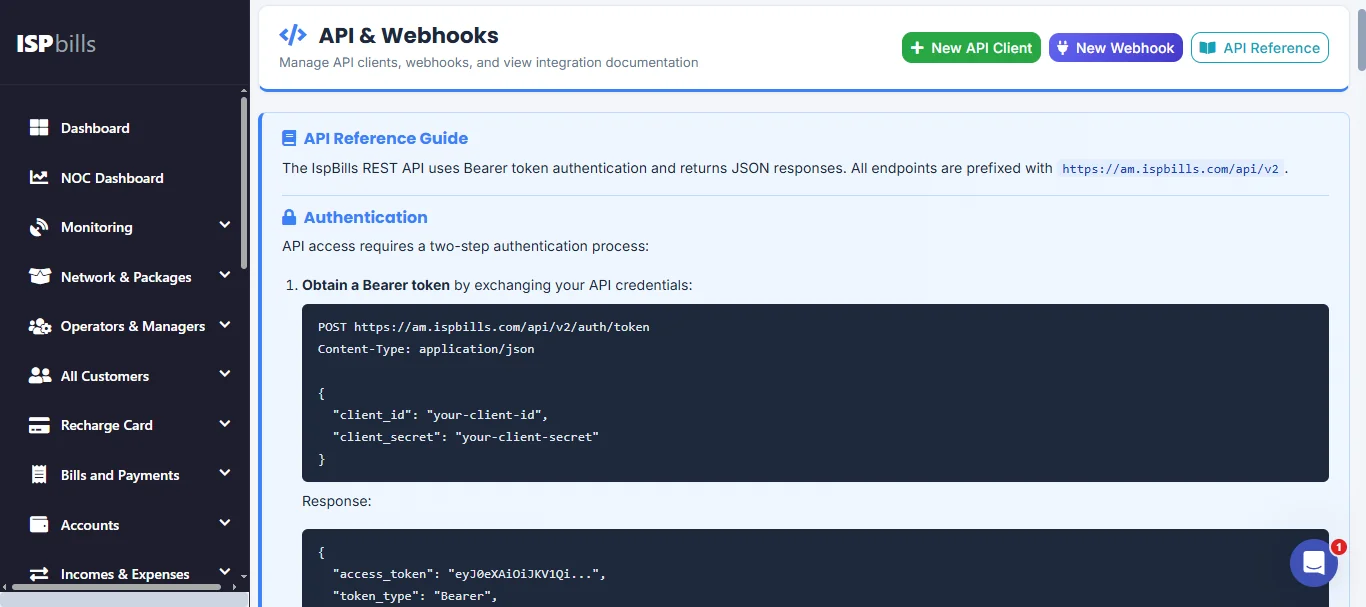
API v2 is the preferred API for all new integrations. It offers a consistent resource-oriented design, granular rate limiting, and expanded functionality. API v1 remains available for backward compatibility but will not receive new endpoints.
API Clients
Creating an API Client
- Navigate to Integrations → API Management in the sidebar.
- Click Create API Client.
- Enter a descriptive name for the client (e.g., "Mobile App", "Custom Dashboard", "Billing CRM").
- For v1 clients, click Generate Token to receive an API token and refresh token pair.
- For v2 clients, a Client ID and Client Secret are generated automatically.
- Copy and store all credentials immediately — secret values are displayed only once.
Managing API Clients
From the API Management page you can:
- View all active API clients, their type (v1 or v2), and creation dates.
- Regenerate or rotate tokens and secrets if credentials are compromised.
- Revoke access by deleting an API client.
- Monitor last-used timestamps to identify stale integrations.
Security: Treat API tokens and client secrets like passwords. Never commit them to version control, embed them in client-side code, or transmit them over unencrypted channels.
Authentication
ISPBills supports two authentication flows — one for each API version.
API v1 — Bearer Token
Obtain a token by posting credentials to the login endpoint, then include it in every request:
POST /api/auth/login
Content-Type: application/json
Accept: application/json

{
  "email": "admin@example.com",
  "password": "your_password"
}
Response:
{
  "access_token": "eyJhbGciOiJIUzI1NiIsInR5cCI6...",
  "token_type": "bearer",
  "expires_in": 3600,
  "refresh_token": "def50200abc123..."
}
Include the token in subsequent requests:
Authorization: Bearer eyJhbGciOiJIUzI1NiIsInR5cCI6...
Token Refresh
Before the access token expires, exchange the refresh token for a new pair:
POST /api/auth/refresh
Content-Type: application/json
Accept: application/json

{
  "refresh_token": "def50200abc123..."
}
The response returns a fresh access_token and refresh_token.
API v2 — Client Credentials (OAuth 2.0)
API v2 uses a client-credentials flow. Exchange your Client ID and Client Secret for a short-lived access token:
POST /api/v2/auth/token
Content-Type: application/json
Accept: application/json

{
  "client_id": "9b1deb4d-3b7d-4bad-9bdd-2b0d7b3dcb6d",
  "client_secret": "sVn8K4pQ...xZ2mW"
}
Response:
{
  "access_token": "v2_eyJhbGciOiJSUzI1NiIsInR5cCI6...",
  "token_type": "bearer",
  "expires_in": 1800
}
Use the token in the Authorization header for all v2 requests:
Authorization: Bearer v2_eyJhbGciOiJSUzI1NiIsInR5cCI6...
Revoking a Token
To invalidate a token before it expires (e.g., during a security incident):
POST /api/v2/auth/revoke
Authorization: Bearer v2_eyJhbGciOiJSUzI1NiIsInR5cCI6...
A 204 No Content response confirms successful revocation.
v2 tokens have a shorter default lifetime (30 minutes) than v1 tokens. Your integration should request a new token automatically when it receives a 401 Unauthorized response.
Pagination
All list endpoints that may return large result sets support cursor-based pagination through query parameters.
| Parameter | Type | Default | Description |
|---|---|---|---|
page |
integer | 1 |
The page number to retrieve. |
per_page |
integer | 20 |
Number of records per page (max 100). |
Example request:
GET /api/v2/customers?page=2&per_page=50
Authorization: Bearer YOUR_TOKEN
Paginated response envelope:
{
  "data": [ ... ],
  "meta": {
    "current_page": 2,
    "per_page": 50,
    "total": 523,
    "last_page": 11
  }
}
Always check meta.last_page to know when you have retrieved all records. Avoid hardcoding page counts.
Error Handling
The API returns consistent error responses across both v1 and v2. Errors use standard HTTP status codes and include a structured JSON body.
Error Response Format
{
  "error": {
    "code": "VALIDATION_ERROR",
    "message": "The given data was invalid.",
    "details": {
      "email": ["The email field is required."],
      "package_id": ["The selected package is invalid."]
    }
  }
}
Common Status Codes
| Status Code | Meaning | Typical Cause |
|---|---|---|
400 |
Bad Request | Malformed JSON or missing required fields. |
401 |
Unauthorized | Missing, expired, or invalid token. |
403 |
Forbidden | Valid token but insufficient permissions. |
404 |
Not Found | Resource does not exist or has been deleted. |
422 |
Unprocessable Entity | Validation failed — check error.details. |
429 |
Too Many Requests | Rate limit exceeded — see Rate Limits below. |
500 |
Internal Server Error | Unexpected server-side failure. |
Always inspect the error.details object on 422 responses. It contains per-field validation messages that should be surfaced to the end user or logged for debugging.
API v1 Reference
All v1 endpoints are prefixed with /api/v1 and require a valid Bearer token obtained via POST /api/auth/login. Authentication is enforced by the auth:api middleware.
Dashboard
| Method | Endpoint | Description |
|---|---|---|
GET |
/v1/dashboard |
Dashboard summary |
GET |
/v1/noc/dashboard |
NOC dashboard |
Customers
| Method | Endpoint | Description |
|---|---|---|
GET |
/v1/customers |
List all customers (paginated) |
POST |
/v1/customers |
Create a new customer |
GET |
/v1/customers/{id} |
Retrieve a single customer by ID |
POST |
/v1/customers/{id}/action |
Perform an action (suspend, activate, etc.) |
Example — Create a customer:
POST /api/v1/customers
Authorization: Bearer YOUR_TOKEN
Content-Type: application/json

{
  "name": "Rafiq Ahmed",
  "email": "rafiq@example.com",
  "phone": "01712345678",
  "package_id": 5,
  "address": "House 12, Road 7, Dhanmondi, Dhaka",
  "connection_type": "pppoe"
}
Response (201 Created):
{
  "data": {
    "id": 1042,
    "name": "Rafiq Ahmed",
    "email": "rafiq@example.com",
    "phone": "01712345678",
    "package": "Premium 50 Mbps",
    "status": "active",
    "created_at": "2026-04-10T08:15:00Z"
  }
}
Billing
| Method | Endpoint | Description |
|---|---|---|
GET |
/v1/invoices |
List all invoices |
GET |
/v1/bills |
List all bills |
GET |
/v1/subscriptions |
List all subscriptions |
GET |
/v1/payments |
List all payments |
Network
| Method | Endpoint | Description |
|---|---|---|
GET |
/v1/routers |
List all routers |
GET |
/v1/olts |
List all OLTs |
Monitoring
| Method | Endpoint | Description |
|---|---|---|
GET |
/v1/monitoring/ubiquiti |
Ubiquiti device status |
GET |
/v1/monitoring/cambium |
Cambium device status |
GET |
/v1/monitoring/access-logs |
Device access logs |
GET |
/v1/monitoring/onus |
ONU list |
GET |
/v1/monitoring/status-checks |
Infrastructure status checks |
GET |
/v1/monitoring/zabbix |
Zabbix monitoring data |
SMS
| Method | Endpoint | Description |
|---|---|---|
GET |
/v1/sms/history |
SMS delivery history |
GET |
/v1/sms/balance |
Current SMS balance |
POST |
/v1/sms/send |
Send an SMS |
Example — Send an SMS:
POST /api/v1/sms/send
Authorization: Bearer YOUR_TOKEN
Content-Type: application/json

{
  "phone": "01712345678",
  "message": "Your monthly invoice of 1,200 BDT has been generated. Please pay before April 20."
}
Response (200 OK):
{
  "data": {
    "message_id": "sms_8a3f2c",
    "status": "queued",
    "phone": "01712345678"
  }
}
Operators
| Method | Endpoint | Description |
|---|---|---|
GET |
/v1/operators |
List all operators |
POST |
/v1/operators |
Create a new operator |
PUT |
/v1/operators/{id} |
Update an operator |
POST |
/v1/operators/{id}/suspend |
Suspend an operator |
POST |
/v1/operators/{id}/fund |
Add funds to operator |
VPN
| Method | Endpoint | Description |
|---|---|---|
GET |
/v1/vpn/accounts |
List VPN accounts |
GET |
/v1/vpn/accounts/{account}/config |
Download VPN config file |
Logs
| Method | Endpoint | Description |
|---|---|---|
GET |
/v1/logs/router |
Router logs |
GET |
/v1/logs/hotspot |
Hotspot logs |
GET |
/v1/logs/ppp-auth |
PPP authentication logs |
GET |
/v1/logs/auto-suspension |
Auto-suspension logs |
Recharge Cards
| Method | Endpoint | Description |
|---|---|---|
GET |
/v1/recharge-cards |
List all recharge cards |
API v2 Reference
All v2 endpoints are prefixed with /api/v2. Authentication uses the client-credentials flow described above (auth.api_v2 middleware). v2 endpoints are also subject to per-client rate limiting.
API v2 is the recommended version for all new integrations. It provides full CRUD operations on most resources, standardized response envelopes, and additional endpoints not available in v1 (webhooks management, SMS broadcast, IP pools, and more).
Authentication
| Method | Endpoint | Description |
|---|---|---|
POST |
/v2/auth/token |
Obtain an access token |
POST |
/v2/auth/revoke |
Revoke an access token |
Customers
| Method | Endpoint | Description |
|---|---|---|
GET |
/v2/customers |
List customers (paginated) |
POST |
/v2/customers |
Create a customer |
GET |
/v2/customers/{id} |
Retrieve a customer |
PUT |
/v2/customers/{id} |
Update a customer |
DELETE |
/v2/customers/{id} |
Delete a customer |
GET |
/v2/customers/{id}/bills |
Customer bills |
GET |
/v2/customers/{id}/payments |
Customer payments |
GET |
/v2/customers/{id}/subscriptions |
Customer subscriptions |
GET |
/v2/customers/{id}/usage |
Customer usage statistics |
Example — Create a customer:
POST /api/v2/customers
Authorization: Bearer v2_YOUR_TOKEN
Content-Type: application/json

{
  "name": "Fatima Begum",
  "email": "fatima@example.com",
  "phone": "01898765432",
  "package_id": 12,
  "address": "Apt 4B, Gulshan Tower, Dhaka",
  "connection_type": "fiber",
  "onu_mac": "AA:BB:CC:DD:EE:FF"
}
Response (201 Created):
{
  "data": {
    "id": 2087,
    "name": "Fatima Begum",
    "email": "fatima@example.com",
    "phone": "01898765432",
    "package": {
      "id": 12,
      "name": "Fiber 100 Mbps"
    },
    "connection_type": "fiber",
    "status": "active",
    "created_at": "2026-04-12T14:22:00Z",
    "updated_at": "2026-04-12T14:22:00Z"
  }
}
Example — Update a customer:
PUT /api/v2/customers/2087
Authorization: Bearer v2_YOUR_TOKEN
Content-Type: application/json

{
  "package_id": 15,
  "address": "Suite 6A, Banani Heights, Dhaka"
}
Response (200 OK):
{
  "data": {
    "id": 2087,
    "name": "Fatima Begum",
    "package": {
      "id": 15,
      "name": "Fiber 200 Mbps"
    },
    "address": "Suite 6A, Banani Heights, Dhaka",
    "status": "active",
    "updated_at": "2026-04-13T09:05:00Z"
  }
}
Billing
| Method | Endpoint | Description |
|---|---|---|
GET |
/v2/billing/bills |
List all bills |
POST |
/v2/billing/bills |
Create a bill |
GET |
/v2/billing/bills/{id} |
Retrieve a bill |
PUT |
/v2/billing/bills/{id} |
Update a bill |
DELETE |
/v2/billing/bills/{id} |
Delete a bill |
GET |
/v2/billing/payments |
List all payments |
Example — Create a bill:
POST /api/v2/billing/bills
Authorization: Bearer v2_YOUR_TOKEN
Content-Type: application/json

{
  "customer_id": 2087,
  "amount": 1500,
  "currency": "BDT",
  "due_date": "2026-05-01",
  "description": "Monthly subscription — Fiber 200 Mbps (May 2026)"
}
Response (201 Created):
{
  "data": {
    "id": 8431,
    "customer_id": 2087,
    "amount": 1500,
    "currency": "BDT",
    "status": "unpaid",
    "due_date": "2026-05-01",
    "description": "Monthly subscription — Fiber 200 Mbps (May 2026)",
    "created_at": "2026-04-15T00:00:00Z"
  }
}
Packages
| Method | Endpoint | Description |
|---|---|---|
GET |
/v2/packages |
List all packages |
Network
| Method | Endpoint | Description |
|---|---|---|
GET |
/v2/network/routers |
List all routers |
GET |
/v2/network/olts |
List all OLTs |
GET |
/v2/network/onus |
List all ONUs |
GET |
/v2/network/pools |
List all IP pools |
Monitoring
| Method | Endpoint | Description |
|---|---|---|
GET |
/v2/monitoring/zabbix/hosts |
Zabbix hosts |
GET |
/v2/monitoring/zabbix/problems |
Zabbix active problems |
GET |
/v2/monitoring/devices |
Device status overview |
GET |
/v2/monitoring/status-checks |
Infrastructure status checks |
SMS
| Method | Endpoint | Description |
|---|---|---|
GET |
/v2/sms/balance |
Current SMS balance |
POST |
/v2/sms/send |
Send an SMS to one recipient |
POST |
/v2/sms/broadcast |
Broadcast SMS to multiple recipients |
Example — Send an SMS:
POST /api/v2/sms/send
Authorization: Bearer v2_YOUR_TOKEN
Content-Type: application/json

{
  "phone": "01712345678",
  "message": "Dear customer, your payment of 1,500 BDT has been received. Thank you!"
}
Response (200 OK):
{
  "data": {
    "message_id": "sms_v2_e4c19b",
    "status": "queued",
    "phone": "01712345678",
    "credits_used": 1,
    "credits_remaining": 4820
  }
}
Example — SMS broadcast:
POST /api/v2/sms/broadcast
Authorization: Bearer v2_YOUR_TOKEN
Content-Type: application/json

{
  "phones": ["01712345678", "01898765432", "01611223344"],
  "message": "Scheduled maintenance tonight from 02:00–04:00 AM. Service may be briefly interrupted."
}
VPN
| Method | Endpoint | Description |
|---|---|---|
GET |
/v2/vpn/accounts |
List VPN accounts |
GET |
/v2/vpn/accounts/{id}/config |
Download VPN config file |
Webhooks (v2 only)
| Method | Endpoint | Description |
|---|---|---|
GET |
/v2/webhooks |
List all webhooks |
POST |
/v2/webhooks |
Create a webhook |
PUT |
/v2/webhooks/{id} |
Update a webhook |
DELETE |
/v2/webhooks/{id} |
Delete a webhook |
In v2, webhooks can also be managed programmatically through the API — you no longer need to configure them exclusively through the admin panel.
Webhooks
Webhooks let ISPBills push real-time event notifications to your external systems. Instead of polling the API, your server receives an HTTP POST request whenever a subscribed event occurs.
Setting Up a Webhook
Via the admin panel:
- Go to Integrations → API Management → Webhooks.
- Click Add Webhook Endpoint.
- Enter the URL of your server endpoint that will receive the webhook payload.
- Select the events you want to subscribe to.
- Click Save.
Via the API (v2 only):
POST /api/v2/webhooks
Authorization: Bearer v2_YOUR_TOKEN
Content-Type: application/json

{
  "url": "https://your-server.example/webhooks/ispbills",
  "events": ["customer.created", "payment.received", "bill.generated"],
  "active": true
}
Webhook Events
| Event | Trigger |
|---|---|
customer.created |
A new customer is registered |
customer.suspended |
A customer account is suspended |
customer.activated |
A customer account is activated or reactivated |
payment.received |
A payment is recorded or verified |
bill.generated |
A new bill is generated |
complaint.created |
A new support complaint is submitted |
Webhook Payload
Each webhook sends an HTTP POST request with a JSON body containing the event type, timestamp, and relevant data:
{
  "event": "payment.received",
  "timestamp": "2026-03-15T10:30:00Z",
  "data": {
    "customer_id": 1234,
    "amount": 500,
    "currency": "BDT",
    "method": "bkash",
    "transaction_id": "TXN-9876"
  }
}
Verifying Webhook Signatures
Every webhook request includes an X-Signature header containing an HMAC-SHA256 signature. Always verify this signature on your server to confirm that the request originated from ISPBills.
Verification steps:
- Read the raw request body exactly as received (do not parse and re-serialize).
- Compute an HMAC-SHA256 hash of the body using your webhook secret.
- Compare the computed hash with the value in
X-Signatureusing a timing-safe comparison. - Reject the request if the signatures do not match.
Always verify webhook signatures. Without verification, an attacker could forge webhook payloads and trigger unintended actions in your system.
Rate Limits
To ensure fair usage and platform stability, API requests are rate-limited per client.
| API Version | Tier | Requests per Minute | Notes |
|---|---|---|---|
| v1 | Standard | 60 | Default for all v1 clients |
| v1 | High-volume | 120 | Contact support to upgrade |
| v2 | Standard | 120 | Default for all v2 clients |
| v2 | High-volume | 300 | Contact support to upgrade |
When a rate limit is exceeded, the API returns a 429 Too Many Requests response with the following headers:
| Header | Description |
|---|---|
Retry-After |
Seconds to wait before sending the next request |
X-RateLimit-Limit |
Maximum requests allowed in the current window |
X-RateLimit-Remaining |
Requests remaining in the current window |
Design your integration to respect rate limits gracefully. Implement exponential back-off on 429 responses and cache data that does not change frequently.
Getting Help
- Inspect the
errorobject in API responses — it contains actionable messages and per-field details. - Review the API Request Log in the admin panel (Integrations → API Management → Logs) for request history and debugging.
- Consult the route-level documentation shipped with your ISPBills installation at
/docs/api. - Contact ISPBills support if you need assistance with a custom integration or wish to request a rate-limit increase.