GIS Map — New Feature
New in this release. GIS is now built into ISPbills. The entire NOC, OLT, fiber and customer dataset is live on a single Google Map — no separate VETRO, IQGeo or 3-GIS subscription, no data import. Open the page and the network is on the map.
The GIS Map turns your subscriber, router, OLT, ONU and fiber data into a single live geographic dashboard. Built on Google Maps with a unified layer model inspired by industry tools (VETRO FiberMap, IQGeo, 3-GIS, OSPInsight), it answers the questions you ask every day:
- Where exactly are my offline customers?
- Which OLT serves this complaint area?
- Is there a fiber route already covering this street?
- Which zone has the highest churn this month?
The page lives at NOC → GIS Map (/admin/gis).
What's new
| New | Description |
|---|---|
| Live Network Map | Every router, OLT, ONU, switch and customer rendered as a clickable marker, with status colors pulled from real-time polling. |
| OLT → ONU fiber visualization | Overlapping ONUs are fanned out around the OLT using the optical distance field so every ONU is individually clickable. Fiber polylines are drawn from the fanned positions. |
| Datacenter fallback | Routers / OLTs without lat/lng render at the group admin's address instead of disappearing. |
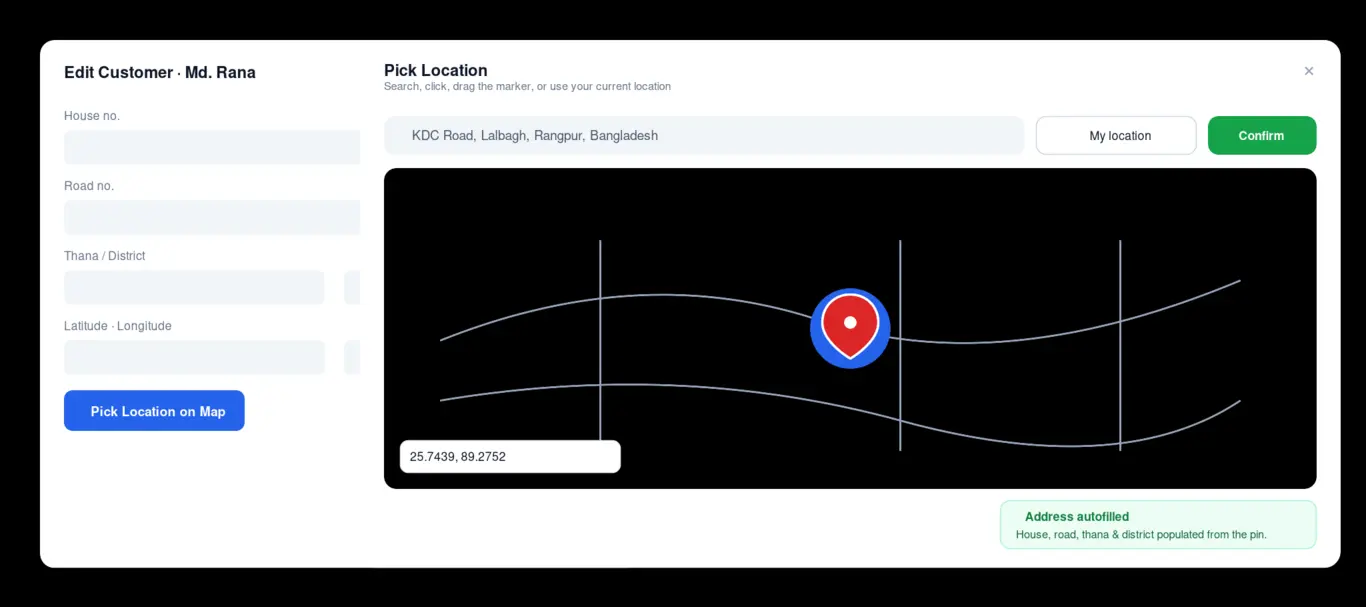
| Pick Location on Map | Single shared map-picker on every customer, router, OLT and device form with bidirectional reverse / forward geocoding. |
| Collapsible Layers panel | High-contrast Layers toggle button (top-left of the map) with per-layer counts and color swatches. State persists in localStorage. |
| Cross-layer search | Type any customer name, IP, router label, OLT or ONU ID — jumps you to the marker. |
| Mobile-friendly | Works on a 5" phone in a van; layer panel auto-hides below 992 px. |
Page anatomy
| Area | Purpose |
|---|---|
| KPI strip | Live counts of customers, routers, OLTs, ONUs and zones |
| Left layer panel | Toggle every layer on/off; per-layer counts and colour swatches |
| Map | The interactive Google Map (street / satellite / hybrid / terrain) |
| Search box | Type a customer name, IP, router label, OLT or ONU identifier — jumps you straight to it |
| Right drawer | Opens when you click any marker; shows full details + a link to edit the customer |
| Toolbar (top-right) | Map type, recenter, fullscreen, export PNG |
| Layer toggle (top-left) | Collapses the left panel for a full-width map; state remembered between visits |
Layers
| Layer | Default | Meaning |
|---|---|---|
| Customers | on | One marker per geo-located subscriber. Cluster icons used at low zoom |
| Routers | on | MikroTik / NAS devices; click to inspect uptime + IP |
| OLTs | on | GPON / EPON OLTs; status colour reflects last poll |
| ONUs | on | Individual ONU endpoints. When several ONUs share the OLT coordinate, the map fans them out around the OLT using the ONU distance field so each one is clickable |
| Switches | off | Managed switches with coordinates |
| Last-mile links | on | Customer → router fibres |
| Backbone | on | Router → OLT and OLT → ONU fibres (drawn even if the ONU only carries a distance, not a real GPS fix) |
| Coverage | off | Heat-map of customer density |
| Service zones | off | Operator-drawn polygons (delivered, planned, retired) |
| Live sessions | off | Currently authenticated PPPoE / hotspot sessions |
| Planning routes | off | Proposed fibre paths saved from the planning tool |
Datacenter fallback — Any router or OLT saved without latitude/longitude is automatically rendered at the group admin's address coordinates (the operator's
latitude/longitudeprofile fields). This guarantees the map is never empty just because a device record is missing GPS metadata.
Picking locations for devices and customers
Every form that stores latitude and longitude (customer create/edit, router create/edit, OLT create/edit, device create/edit) has the same Pick Location on Map button. The button opens a single shared map-picker modal that:
- Loads a fresh Google Map in a few hundred ms (async loader, no version pinning).
- Recognises an existing coordinate and centres on it; otherwise centres on the group admin's datacenter coordinate.
- Supports Search, Use my current location, click anywhere on the map, and drag-and-drop the marker.
- On confirm, autofills:
latitudeandlongitudeof the form,- house no., road no., thana and district fields when they're blank (reverse-geocoded from Google's address components).
- Reverse-geocodes whenever the operator manually edits the lat/lng inputs, and forward-geocodes whenever the address fields change — bidirectional sync, never overwriting fields you've already typed in.
This is the same component used in the Customer Edit modal on the customers list, so the modal now also has latitude/longitude + the pick-on-map button (previously missing).
Reverse- and forward-geocoding API
| Method | URL | Returns |
|---|---|---|
| GET | /admin/api/gis/reverse-geocode?lat=…&lng=… |
{ address, components: { house_no, road_no, thana, district, postal_code, country, formatted_address } } |
| GET | /admin/api/gis/forward-geocode?address=… |
{ lat, lng, formatted_address } |
Both call the Google Geocoding API. The Google Maps integration is enabled by default on your ISPBills instance — no additional configuration is needed.
Search
The search box does a fuzzy in-memory lookup over all loaded layers — customers, routers, OLTs, ONUs, switches — so it works offline (no extra API calls). Hits are grouped by type; clicking a row pans + zooms the map and opens the matching marker.
Drawer actions
Clicking a customer marker opens the right drawer with:
- Username, phone, package, status badge,
- Last seen timestamp,
- Buttons: Open Customer, Send SMS, Mark resolved (when opened from a complaint context).
For routers, OLTs and ONUs the drawer shows the linked devices and a button to open the device's monitor page.
Hide the side panel
The chevron at the top-left of the map collapses the layer panel. Useful for presentations and for small screens. The state is persisted in localStorage so the panel stays as you left it.
Mobile behaviour
The GIS page is fully usable on a phone. The left panel hides automatically on screens narrower than 992 px; tap the chevron to show it. KPI tiles re-flow to a 2-column grid.
Related pages
- Network Topology — same data, drawn as a logical graph instead of a geographic map
- Customer Zones — the polygons rendered as the Service Zones layer
- Coverage Analysis — heat-map and density reports
Troubleshooting
| Symptom | Fix |
|---|---|
| Map is blank | Open the browser console: if you see Google Maps JavaScript API … RefererNotAllowedMapError, add your domain in the Google Cloud Console. The page surfaces the error banner automatically. |
| "Maps JavaScript API has not been activated" | Enable the "Maps JavaScript API", "Geocoding API" and "Places API" in the same Google Cloud project as your API key. |
| All ONUs look stacked on the OLT | This is expected when ONUs share the OLT's coordinate. Toggle the ONUs layer; the map fans them out in a circle using the ONU distance field — each one is individually clickable. |
| Picker button does nothing | Hard refresh (Ctrl+Shift+R). The picker is a singleton modal loaded once per page; cached old per-form pickers can clash. |