OLT Management
Manage OLT devices from 12 supported vendors including VSOL, Huawei, ZTE, Fiberhome, Nokia, C-Data, DBC, BDCOM, HIOSO, Syrotech, Raisecom, and Generic — with SNMP auto-discovery, CLI access, and running-config download.
OLT Management
What Is an OLT?
An OLT (Optical Line Terminal) is the central piece of equipment in a Passive Optical Network (PON) fibre-optic deployment. It sits at the ISP's headend or data centre and communicates over fibre cables with many ONU (Optical Network Unit) devices installed at customer premises. Managing your OLTs correctly is essential for delivering reliable fibre broadband services.
ISPBills supports 12 OLT vendors with varying levels of integration — from full SNMP + CLI access down to basic SNMP-only discovery.
Supported OLT Vendors
The following table lists every vendor supported by ISPBills, along with the features available for each:
| Brand | Discovery | CLI Access | Running Config | Popular Models |
|---|---|---|---|---|
| VSOL | SNMP + CLI | ✅ Full | ✅ | V1600G, V1600D |
| DBC | SNMP + CLI | ✅ Full | ✅ | DBC-8240 |
| Fiberhome | SNMP + CLI | ✅ Full | ✅ | AN5516-01, AN5006-20 |
| ZTE | SNMP | ❌ | ✅ | C300, C320, C600 |
| Huawei | SNMP | ❌ | ✅ | MA5608T, MA5680T, MA5800 |
| BDCOM | SNMP | ❌ | ✅ | P3310B, P3608, GP3600 |
| HIOSO | SNMP (via VSOL) | ✅ via VSOL | ✅ | HA7000, HA7302 |
| Syrotech | SNMP (via VSOL) | ✅ via VSOL | ✅ | SY-GPON-1600 |
| C-Data | SNMP | ❌ | ❌ | FD1104SN, FD1204SN |
| Nokia | SNMP | ❌ | ❌ | ISAM 7360 |
| Raisecom | SNMP | ❌ | ❌ | ISCOM5800E |
| Generic | SNMP (CTC/RFC) | ❌ | ❌ | Any SNMP-enabled OLT |
Vendor Tiers
ISPBills groups OLT vendors into three tiers based on feature depth:
Tier 1 — Full Integration (SNMP + CLI + Running Config) VSOL, DBC, and Fiberhome offer the deepest integration. ISPBills can discover ONUs via SNMP, open a CLI session (Telnet/SSH) for management commands, and download the full running configuration for backup or audit purposes.
Tier 2 — SNMP + Running Config (No CLI) ZTE, Huawei, BDCOM, HIOSO, and Syrotech support SNMP-based ONU discovery and running-config download. CLI access is not available through ISPBills for these vendors (manage them through their native management tools for CLI operations).
Tier 3 — SNMP Discovery Only C-Data, Nokia, Raisecom, and the Generic handler provide SNMP-based ONU discovery but do not support CLI access or running-config download.
Brand Alias System: HIOSO and Syrotech OLTs are CTC-compatible and internally use the VSOL handler for SNMP discovery and CLI access. When you select HIOSO or Syrotech as the brand, ISPBills automatically routes requests through the VSOL protocol handler. This means these brands benefit from the same SNMP walk logic and CLI command set as native VSOL devices.
SNMP Discovery
ISPBills uses SNMP (Simple Network Management Protocol) to automatically discover and monitor ONUs connected to each OLT. The discovery process works as follows:
- SNMP Walk — ISPBills periodically walks the OLT's OID tables using the configured SNMP community string (default:
public). It queries standard and vendor-specific MIBs to enumerate all connected ONUs. - MAC / Serial Resolution — For each discovered ONU, ISPBills resolves the MAC address and serial number from the SNMP response. These identifiers are used to uniquely identify each ONU device.
- Status Mapping — The ONU's operational status (online, offline, power-off, LOS) is read from SNMP status OIDs and mapped to ISPBills status codes displayed in the ONU list.
- Optical Signal Levels — Where supported by the vendor's MIB, ISPBills also reads optical power levels (Rx/Tx) for each ONU to help diagnose signal quality issues.
The Generic brand uses standard CTC (China Telecom Corporation) and RFC-based OIDs. Select this for any SNMP-enabled OLT that is not explicitly listed. Discovery will work, but vendor-specific features (CLI, running config) will not be available.
Adding an OLT
To register an OLT in ISPBills, navigate to Monitoring › OLT Management and click Add OLT. Complete the following fields:
- IP Address — The management IP address of the OLT.
- Username — The administrator username for the OLT's management interface (used for CLI access on Tier 1 vendors).
- Password — The corresponding administrator password.
- Port — The management port used to connect to the OLT (commonly Telnet port 23, SSH port 22, or a vendor-specific port).
- Brand — Select the OLT vendor from the dropdown. The dropdown lists all 12 supported brands: VSOL, DBC, Fiberhome, ZTE, Huawei, BDCOM, HIOSO, Syrotech, C-Data, Nokia, Raisecom, and Generic.
- SNMP Community — The SNMP community string for read access (default:
public). This must match the community string configured on the OLT itself.
The fields displayed may vary depending on the selected Brand. For Tier 1 vendors (VSOL, DBC, Fiberhome), the Username, Password, and Port fields are required for CLI access. For Tier 3 vendors (C-Data, Nokia, Raisecom, Generic), only the IP Address and SNMP Community are strictly necessary.
Save the record. ISPBills will attempt to connect to the OLT via SNMP and retrieve initial status data, including the list of connected ONUs.
OLT List and Status
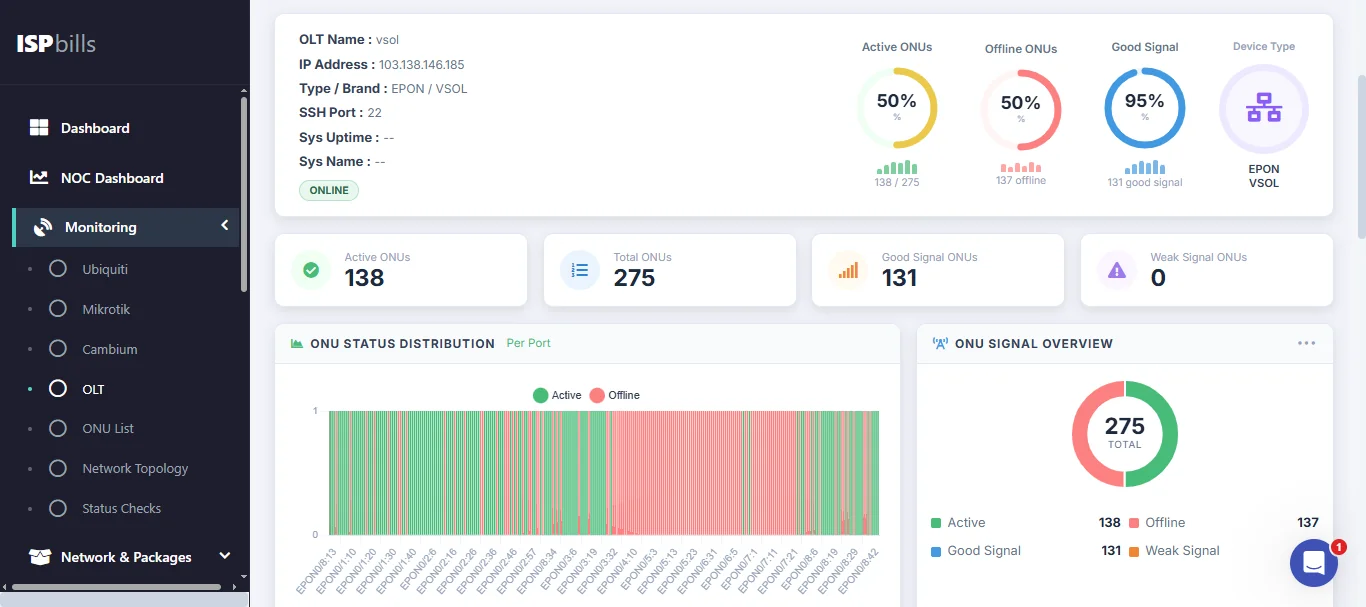
The OLT list page shows all registered OLTs with their name, IP address, brand, and current status (Online or Offline). An offline OLT requires immediate attention as it will affect all fibre customers served by that device.
Running Config Download
For supported vendors, ISPBills can download the OLT's current running configuration. This is useful for configuration backup, auditing, and disaster recovery.
Supported vendors: VSOL, DBC, Fiberhome, ZTE, Huawei, BDCOM, HIOSO, and Syrotech.
The command used to retrieve the running configuration varies by vendor:
| Brand | Config Command |
|---|---|
| Huawei | display current-configuration |
| Fiberhome | display current-configuration |
| ZTE | show running-config |
| VSOL | show running-config |
| DBC | show running-config |
| BDCOM | show running-config |
| HIOSO | show running-config (via VSOL handler) |
| Syrotech | show running-config (via VSOL handler) |
To download a running config, open an OLT's detail page and click Download Running Config. The configuration is saved as a text file and stored in the ISPBills system for historical reference.
C-Data, Nokia, Raisecom, and Generic OLTs do not support running-config download through ISPBills. Use the vendor's native management tools for configuration backup on these devices.
ONU Auto-Mapping
When ISPBills discovers ONUs via SNMP, it can automatically link each ONU to an existing customer record. The auto-mapping process works as follows:
- Discovery — SNMP discovery retrieves the ONU's MAC address and serial number from the OLT.
- Lookup — ISPBills searches existing customer records for a matching MAC address or serial number.
- Linking — If a match is found, the ONU is automatically associated with that customer. The customer's connection status, optical signal levels, and OLT/PON port information are then visible from their profile.
- Unmatched ONUs — ONUs that cannot be matched to a customer appear in the unlinked ONU list. An administrator can manually assign them to a customer or investigate whether the device is authorized.
This auto-mapping ensures that your fibre customer records stay in sync with the physical network without manual intervention.
OLTs and ONUs
Each OLT supports multiple PON ports, and each PON port serves a number of ONU devices installed at customer sites. ISPBills links ONU records to their parent OLT, allowing you to trace a fibre customer's connection all the way back to the OLT port. See the ONU List chapter for details on managing the customer-side devices.
Troubleshooting
SNMP Discovery Not Working
- Community string mismatch — Ensure the SNMP community string configured in ISPBills matches the one set on the OLT. The most common mistake is using
publicin ISPBills when the OLT has been configured with a custom community string. - Firewall rules — SNMP uses UDP port 161 by default. Verify that your firewall allows UDP traffic on port 161 between the ISPBills server and the OLT's management IP.
- SNMP version — ISPBills uses SNMPv2c by default. Ensure the OLT has SNMPv2c enabled (some devices ship with only SNMPv1 or SNMPv3 configured).
- IP reachability — Confirm that the ISPBills server can reach the OLT's management IP address. Use
pingorsnmpwalkfrom the ISPBills server to verify connectivity.
OLT Shows Offline
- Check network connectivity between the ISPBills server and the OLT.
- Verify the OLT's management interface is up and responding to SNMP requests.
- Check for SNMP timeout values — if the OLT is on a high-latency link, you may need to increase the SNMP timeout.
CLI Access Fails (Tier 1 Vendors)
- Verify the username, password, and port are correct.
- Ensure the OLT allows Telnet/SSH connections from the ISPBills server's IP address.
- Check if the OLT has a maximum session limit that has been reached.
Running Config Download Fails
- This feature is only available for Tier 1 and Tier 2 vendors (see the Supported OLT Vendors table).
- For Tier 1 vendors, CLI credentials must be correct.
- For Huawei and Fiberhome, ensure the user account has sufficient privileges to execute
display current-configuration.
If your OLT brand is not explicitly listed, try the Generic option. It uses standard CTC/RFC-based SNMP OIDs and will work for basic ONU discovery on most GPON/EPON OLTs.