Status Page
Monitor network service health and share a public status page with customers
Monitor the availability of your network services and infrastructure, and provide customers with a transparent public status page.
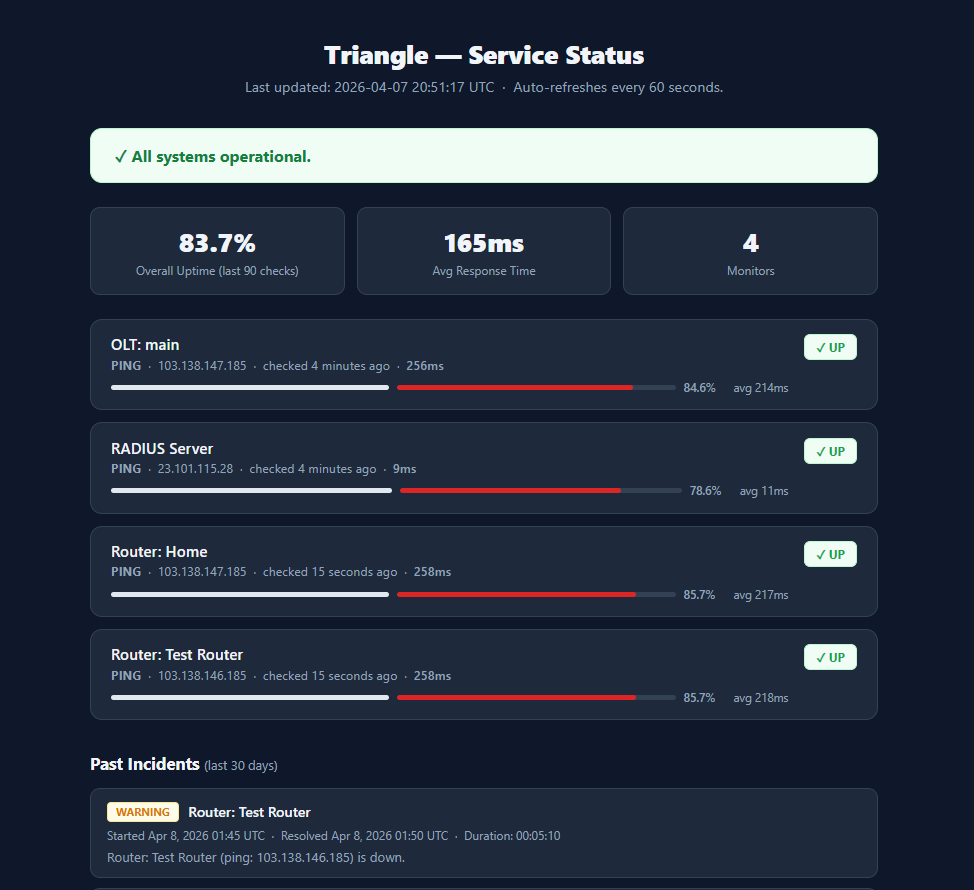
The status page feature helps reduce support tickets by letting customers check service status on their own.
Overview
The status page module enables you to:
- Define status checks for your critical services and infrastructure
- Display a real-time public status page for customers
- Receive alert notifications when a service goes down
- View historical uptime data and incident records
Configuring Status Checks
Status checks periodically test whether your services are reachable and responding correctly.
To add a status check:
- Navigate to the status check configuration section
- Create a new check with the following parameters:
| Parameter | Description |
|---|---|
| Service Name | A descriptive name for the monitored service |
| Check Type | The protocol or method used (e.g., HTTP, ICMP ping, TCP port) |
| Target | The IP address, hostname, or URL to monitor |
| Check Interval | How often the check runs (e.g., every 1, 5, or 10 minutes) |
| Timeout | Maximum wait time before marking the check as failed |
- Save and enable the check
Set realistic check intervals and timeouts. Very frequent checks may generate unnecessary load on monitored hosts, while long intervals may delay outage detection.
Public Status Page
ISPBills can generate a customer-facing status page that displays the current state of all monitored services.
Key features:
- Real-time status indicators — shows whether each service is operational, degraded, or down
- Uptime history — displays uptime percentages over recent days or weeks
- Incident timeline — lists recent incidents and their resolution status
- Custom branding — the status page can be styled to match your company branding
Share the status page URL with your customers or embed a link in your support portal to deflect common "is it down?" inquiries.
Alert Notifications
Configure alerts to notify your team when a status check fails.
- Set up notification channels such as email, SMS, or WhatsApp
- Define escalation rules for prolonged outages
- Configure recovery notifications to know when services come back online
Combine status page alerts with your existing WhatsApp or email integration for unified notification delivery.
Interpreting Status Results
| Status | Meaning |
|---|---|
| Operational | The service is responding normally within the expected time |
| Degraded | The service is responding but with higher latency or partial failures |
| Down | The service is unreachable or not responding |
| Maintenance | The service is under planned maintenance |
Review status history regularly to identify recurring issues and infrastructure bottlenecks. Use uptime reports to measure service level compliance.
If a check consistently shows degraded status, investigate the underlying cause — it could indicate network congestion, hardware issues, or resource exhaustion on the monitored host.